
NextGen on your home screen
Install our web app for quick access to your company account, quotations, approvals and orders. No APK download or app-store account required.
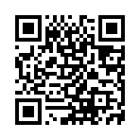
Scan with your phone camera, open the link, then follow the installation instructions.
store.nextgenpng.net/installFollow the instructions below to install.
Android
Open this page in Chrome. Tap Install NextGen when offered, or open the browser menu and choose Install app or Add to Home screen. Confirm on your phone.
iPhone or iPad
Open this page in Safari. Tap Share, choose Add to Home Screen, enable Open as Web App if shown, then tap Add.
Using the app
Open the NextGen icon and sign in with your business account. An internet connection is required for purchases, approvals and account information. Installation does not grant company access or bypass login.